One of the big benefits of having a Homelab and plenty of services running locally is that I can start connecting them together and using them for various things. TLDR, automating like crazy. Not to mention that there are some things running on the wild internet that I do not plan to self-host and those are still valuable to me and want to integrate them into my whole ecosystem.
Do want to point out you can also use some of these services by paying a subscription as most things nowadays, you could use free tiers but once you hit a limit, hide your kids, hide your wallet.
Now, whenever I do automation at home, 90% of the times it is a very repetitive pattern:
- Start putting together a bunch of bash scripts that would call something to retrieve some data
- Format or parse the data. Enrich as needed.
- Send a payload elsewhere and eventually achieve the automation’s objective.
- Profit
That approach worked for a couple of years, especially for notifications whenever something went down in the Homelab that needed my attention and things like Grafana couldn’t handle already, so with more services running locally and more integrations running I discovered the no-code automation tools that made things so simple that even someone that isn’t a “tech bro” would be able to use them. On top of that, the hype with AI made automation even more desirable since it could also be expanded to develop these so-called “AI Agents,” which to me are basically (Hot Take of the week 🔥) big cronjobs that either run on a schedule or react to an event, following an event-driven architecture design, but doesn’t take off the fact they pretty much just do the same methodology of the automation pattern mentioned above.
So, enough history, what am I using and what am I doing with it? – I’m running a local version of n8n which again you can get started using their free tier but since I have the hardware I always try to run things myself to keep my data under control we self host it.
Now, what am I using it for? – Don’t have an answer per se for that since it can pretty much connect to thousands of services so I’m going to give you some example workflows. ️
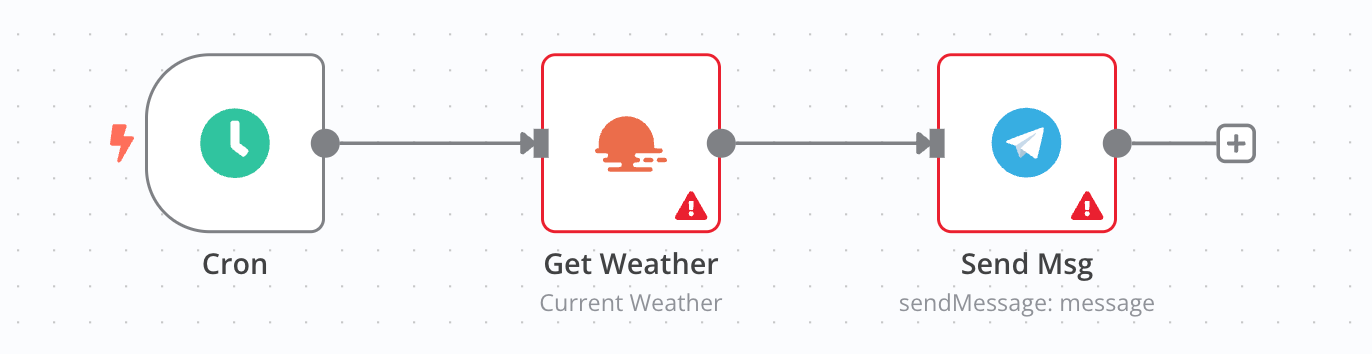
Get the weather
This one is kind of dumb but as a busy father I need to be prepared for the weather so the kids use the proper wardrobe for the daily activities so I have designed a simple workflow that runs every day at 7AM giving me the current weather in a notification via Telegram.
Daily review of my Todoist tasks
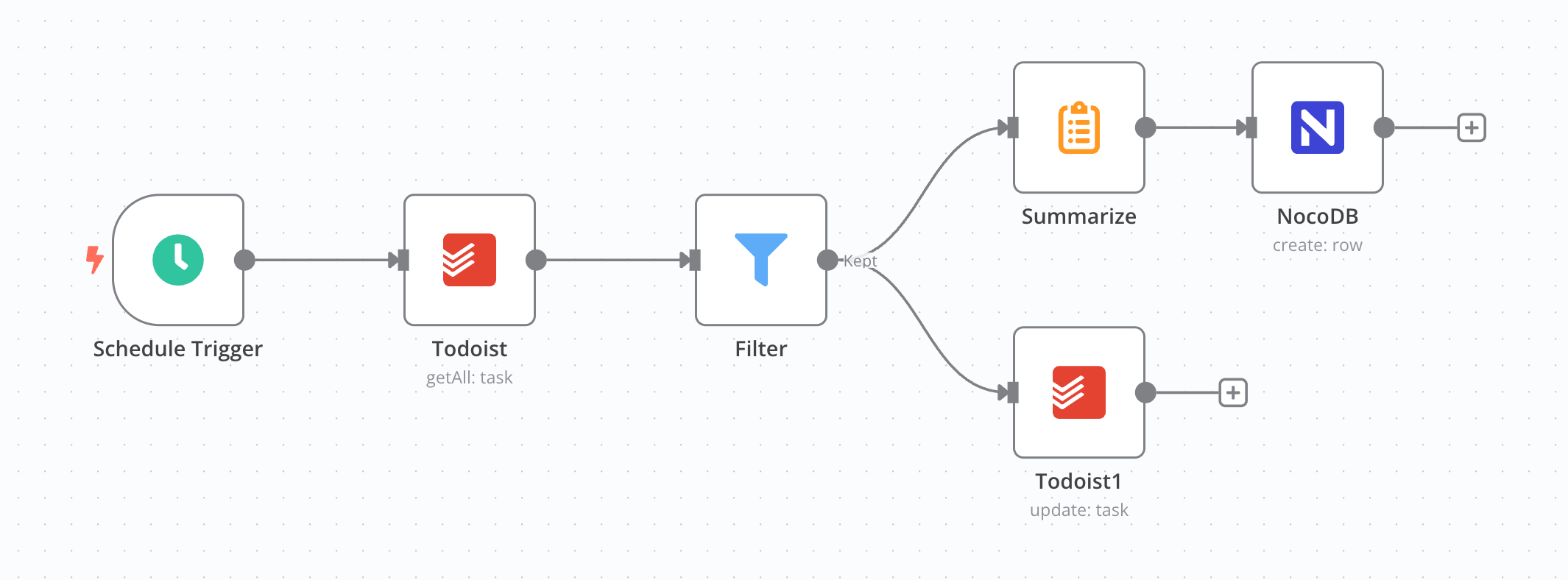
Todoist is my default task manager so as someone that tries to follow GTD, I tend to dump everything out of my brain into the tool quickly and every now and then I review the list of tasks in the system, but since things then to go all over the place within my project I needed to go into each one of them to try and find what was overdue, without labels or dates. Well no more as I have a workflow that kicks off and does that for me, everything that don’t match a filter or criteria will get a label @review so I can easily spot them and organize my tasks.
 ## Sync Tasks-Issues in Github
Some of the tasks in my manager are related to small little projects I have on Github like my twitch-bot or my k8s homelab applications, so whenever I want to do something or try a new tool I create a "ticket" for myself, which having in todoist is probably enough but since those project are open for the public I once had some issues created in one of the repos for a [neovim plugin](https://mvaldes.dev/projects/terraform-nvim) I made and I completely ignored it for weeks since i rarely review that section within Github so in order to make it all easy to find and use the workflow syncs things between systems now.
## Sync Tasks-Issues in Github
Some of the tasks in my manager are related to small little projects I have on Github like my twitch-bot or my k8s homelab applications, so whenever I want to do something or try a new tool I create a "ticket" for myself, which having in todoist is probably enough but since those project are open for the public I once had some issues created in one of the repos for a [neovim plugin](https://mvaldes.dev/projects/terraform-nvim) I made and I completely ignored it for weeks since i rarely review that section within Github so in order to make it all easy to find and use the workflow syncs things between systems now.
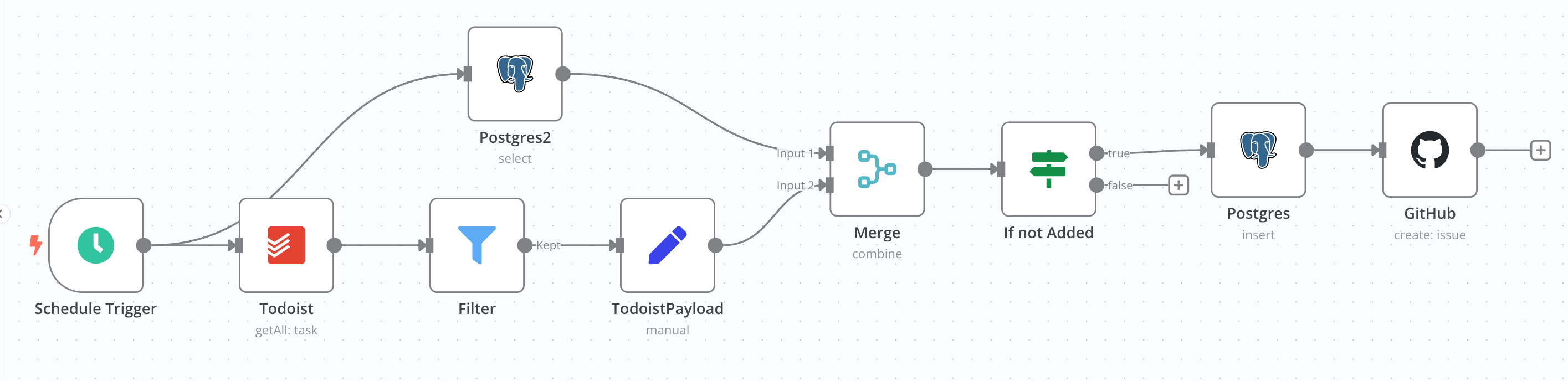
This one took a lot of time as I ended up having repetitive things in either tool so a database had to be included to keep track of what was already in a either system.
Adopt a Dog
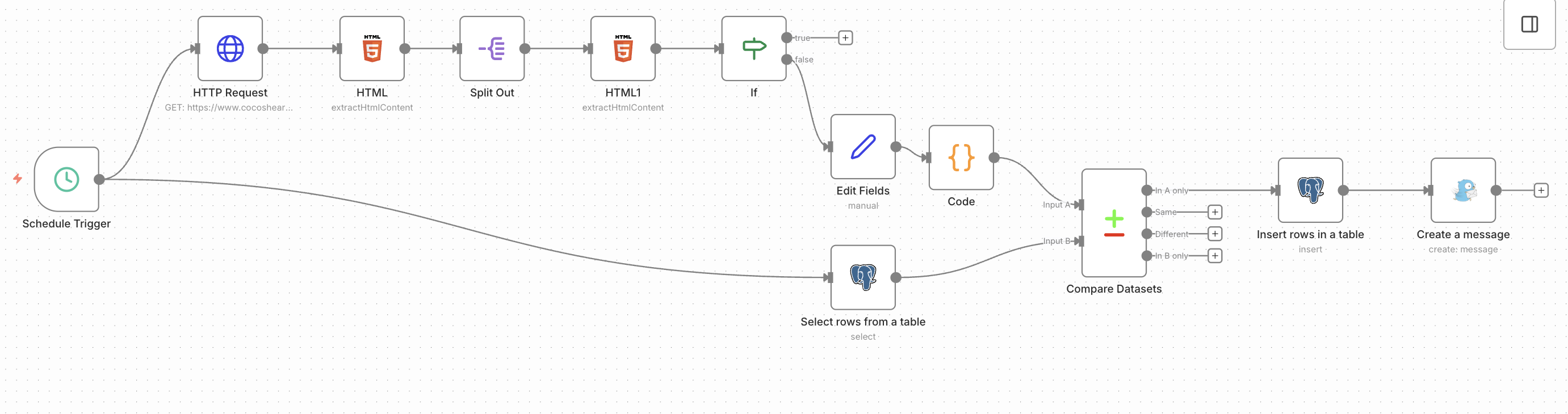
This is the one I’m most proud of, I basically created a web scrapper that goes against my local shelter and grabs the results when new pups are added to the site, which I then put on a table with the details like Breed, Size, Date of Birth and any descriptions or comments which is then sent over to me via notification using Gotify, another service I want to use more for everything notification related.
 ## That's only the beginning
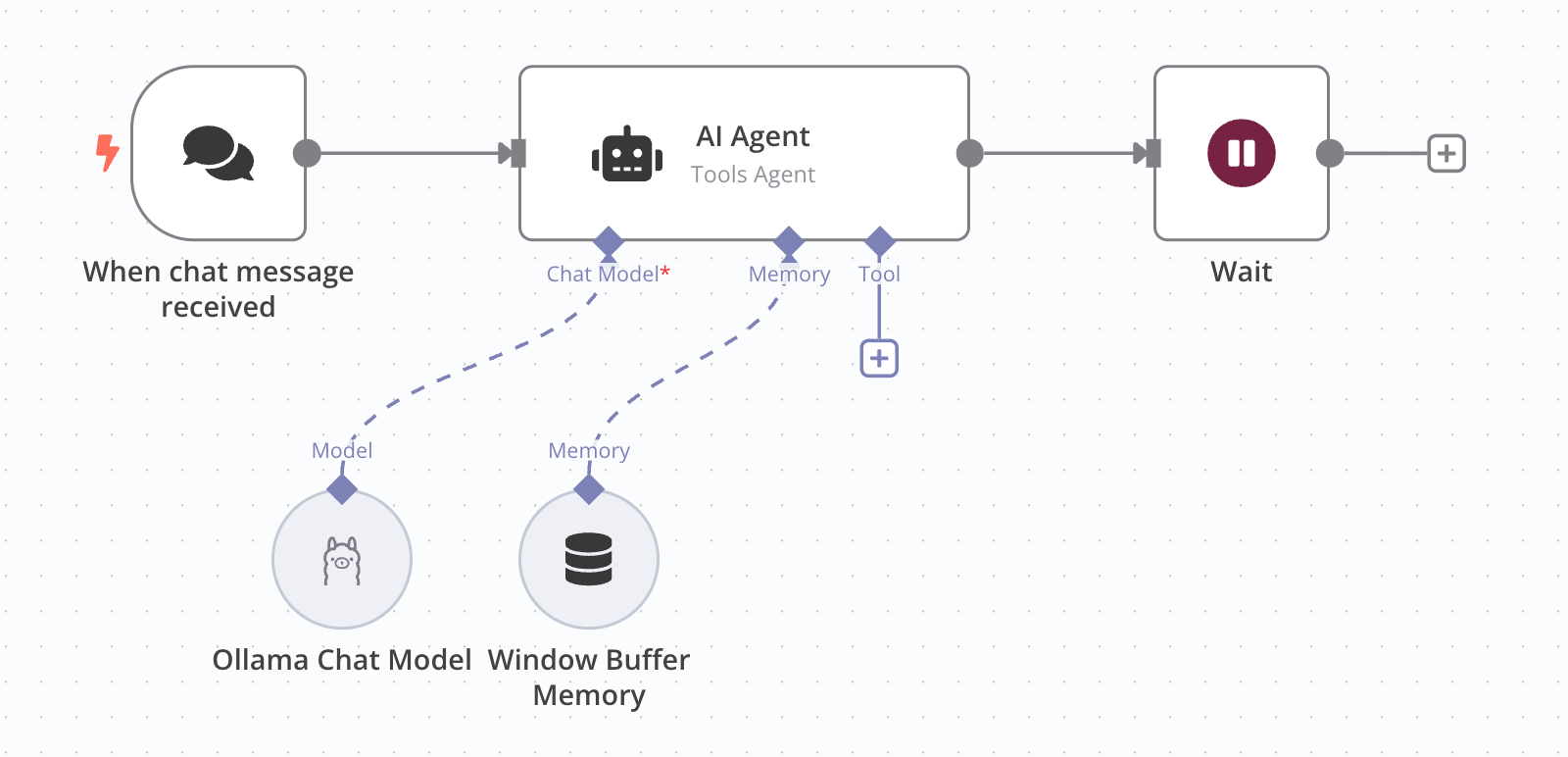
AI is here to stay so the next workflow I do will use some model to do something fancy, I have yet to find a good use case for it but I will be ready with the infrastructure to run it as I also run my own models locally thanks to Ollama.
## That's only the beginning
AI is here to stay so the next workflow I do will use some model to do something fancy, I have yet to find a good use case for it but I will be ready with the infrastructure to run it as I also run my own models locally thanks to Ollama.
 ## Conclusion
What I love about the whole n8n ecosystem is that it can be triggered by a lot of different inputs or events, most of the ones I came up with are still cron timers __BUT__ I've been playing with Webhooks and getting them to work and trigger something took me less than 3 minutes which is great as it abstracts the complexity of standing up the Web server and listener for you as it can dedicate a specific endpoint for each workflow which can call other workflows, I've seen videos on the youtube about people having automations with 40+ nodes that do some convoluted actions as well as people claiming that these so called "AI Agents" are being used to make money which I don't doubt a single bit they make some actual real money as the tool can integrate with thousands of other systems so for people running a business this totally makes sense.
## Conclusion
What I love about the whole n8n ecosystem is that it can be triggered by a lot of different inputs or events, most of the ones I came up with are still cron timers __BUT__ I've been playing with Webhooks and getting them to work and trigger something took me less than 3 minutes which is great as it abstracts the complexity of standing up the Web server and listener for you as it can dedicate a specific endpoint for each workflow which can call other workflows, I've seen videos on the youtube about people having automations with 40+ nodes that do some convoluted actions as well as people claiming that these so called "AI Agents" are being used to make money which I don't doubt a single bit they make some actual real money as the tool can integrate with thousands of other systems so for people running a business this totally makes sense.
Would recommend that you try it out and get some automations going on, you don’t need to be a proficient coder to get these working so the barrier of entry is incredibly low and thats a good thing!.
The days of doing bash scripts are over for me…?
Until the next one, Adios 👋